
Latency and Throughput
The Two Pillars of Performance
Section titled “The Two Pillars of Performance”When measuring system performance, two metrics matter most:

Understanding Latency
Section titled “Understanding Latency”Latency is the time between sending a request and receiving a response.
Latency Breakdown
Section titled “Latency Breakdown”Every request goes through multiple stages:

Types of Latency
Section titled “Types of Latency”| Type | Description | Typical Values |
|---|---|---|
| Network Latency | Time for data to travel over network | 1-100ms |
| Processing Latency | Time for server to process request | 1-50ms |
| Database Latency | Time for database queries | 1-10ms |
| Queue Latency | Time spent waiting in queues | 0-1000ms+ |
Percentile Latencies: P50, P95, P99
Section titled “Percentile Latencies: P50, P95, P99”Average latency can be misleading. Percentiles give a better picture:

Why P99 Matters
Section titled “Why P99 Matters”Real-World Example: E-Commerce Checkout Latency
Section titled “Real-World Example: E-Commerce Checkout Latency”Company: Amazon, eBay, Shopify
Scenario: Checkout pages must load quickly to prevent cart abandonment. Even small latency increases can significantly impact conversion rates.
Implementation: Uses parallel API calls and caching:

Understanding Throughput
Section titled “Understanding Throughput”Throughput is the amount of work done per unit of time.
Common Throughput Metrics
Section titled “Common Throughput Metrics”| Metric | Description | Example |
|---|---|---|
| RPS | Requests per second | 10,000 RPS |
| TPS | Transactions per second | 5,000 TPS |
| QPS | Queries per second | 50,000 QPS |
| Bandwidth | Data transferred per second | 1 Gbps |
Throughput Calculation
Section titled “Throughput Calculation”Throughput is calculated as:
Throughput = Total Requests / Time PeriodExample: If your server handles 10,000 requests in 10 seconds, your throughput is 1,000 RPS.
Key considerations:
- Measure over time - instantaneous measurements fluctuate
- Track success rate - failed requests count against effective throughput
- Monitor under load - throughput often drops when the system is stressed
Latency vs Throughput: The Trade-off
Section titled “Latency vs Throughput: The Trade-off”They’re related but independent:
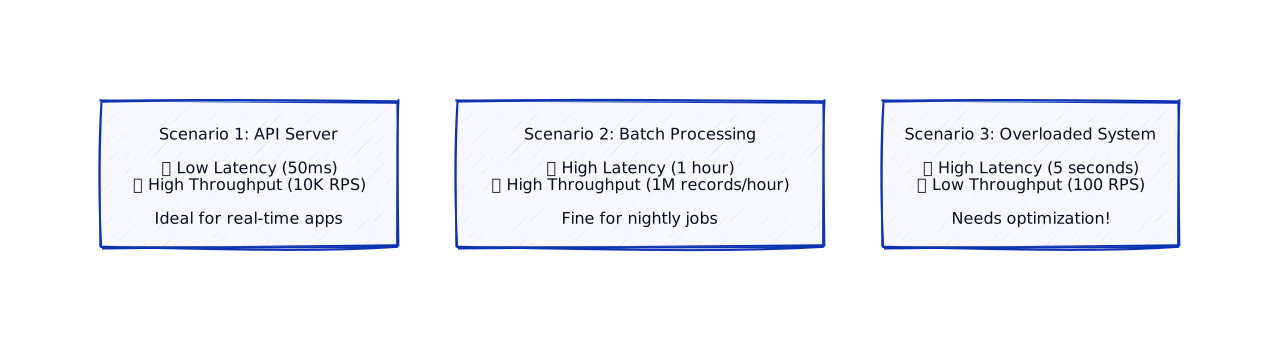
Little’s Law
Section titled “Little’s Law”A fundamental relationship:
Average Concurrent Requests = Throughput × Average LatencyExample:
- Throughput: 1,000 RPS
- Average Latency: 100ms = 0.1 seconds
- Concurrent Requests: 1,000 × 0.1 = 100 requests in flight
How Method Design Impacts Performance
Section titled “How Method Design Impacts Performance”Your code decisions directly affect latency and throughput:
Bad: Sequential Operations
Section titled “Bad: Sequential Operations”Good: Parallel Operations
Section titled “Good: Parallel Operations”
Caching: The Latency Killer
Section titled “Caching: The Latency Killer”Caching is the most effective way to reduce latency. The idea is simple: store frequently accessed data closer to where it’s needed.
Multi-Level Cache Architecture
Section titled “Multi-Level Cache Architecture”
Latency Math
Section titled “Latency Math”With this caching strategy:
| Level | Latency | Hit Rate |
|---|---|---|
| L1 (Local) | 0.01ms | 90% |
| L2 (Redis) | 2ms | 9% |
| Database | 30ms | 1% |
Average latency = 0.9(0.01) + 0.09(2) + 0.01(30) = 0.49ms
That’s a 60x improvement over hitting the database every time!
Measuring Performance
Section titled “Measuring Performance”Key Metrics to Track
Section titled “Key Metrics to Track”| Metric | What It Tells You | Action Threshold |
|---|---|---|
| P50 | Typical user experience | Baseline for “normal” |
| P95 | Most users’ worst case | Watch for drift |
| P99 | Outlier experience | Investigate if > 3x P50 |
| Error Rate | System health | Alert if > 1% |
Tools for Measurement
Section titled “Tools for Measurement”In Production:
- APM Tools: Datadog, New Relic, Dynatrace
- Metrics: Prometheus + Grafana
- Distributed Tracing: Jaeger, Zipkin
In Development:
- Profilers: cProfile (Python), JProfiler (Java)
- Benchmarking: pytest-benchmark, JMH
Real-World Examples
Section titled “Real-World Examples”Example 1: Google Search Latency Optimization
Section titled “Example 1: Google Search Latency Optimization”Company: Google
Scenario: Google Search must return results in milliseconds. Even 100ms delay can reduce user satisfaction and search volume.
Implementation: Uses parallel processing and caching:

Why This Matters:
- Scale: Billions of queries per day
- Latency Impact: 100ms delay = 0.2% search volume reduction
- Performance: Parallel processing reduces latency by 60%
- Result: Sub-100ms average response time
Real-World Impact:
- Queries: 8.5+ billion searches per day
- Latency: Average 50ms, P99 200ms
- Revenue Impact: Every 100ms delay costs millions in ad revenue
Example 2: Amazon Product Page Latency
Section titled “Example 2: Amazon Product Page Latency”Company: Amazon
Scenario: Product pages must load quickly. Amazon found that every 100ms delay reduces sales by 1%.
Implementation: Uses parallel API calls and edge caching:

Why Parallel Processing?
- User Experience: Fast page loads increase conversions
- Revenue Impact: 100ms delay = 1% sales reduction
- Performance: Parallel calls reduce latency by 70%
- Result: 200ms average page load time
Real-World Impact:
- Scale: Billions of product page views daily
- Latency: 200ms average, P99 500ms
- Revenue: Every 100ms optimization worth millions annually
Example 3: Netflix Video Streaming Latency
Section titled “Example 3: Netflix Video Streaming Latency”Company: Netflix
Scenario: Video playback must start quickly. Users expect playback to begin within 2 seconds of clicking play.
Implementation: Uses CDN distribution and adaptive bitrate streaming:

Why Low Latency Matters:
- User Experience: Fast playback start increases engagement
- Retention: Slow start causes users to abandon
- Performance: CDN reduces latency by 90%
- Result: < 2 seconds time to first frame
Real-World Impact:
- Scale: 200+ million subscribers, billions of plays daily
- Latency: < 2 seconds time to first frame
- Engagement: Fast playback increases watch time by 20%
Key Takeaways
Section titled “Key Takeaways”What’s Next?
Section titled “What’s Next?”Now that you understand performance metrics, let’s learn how to identify and fix performance issues:
Next up: Understanding Bottlenecks - Learn to find and eliminate performance bottlenecks.