
NoSQL Databases
What is NoSQL?
Section titled “What is NoSQL?”NoSQL (Not Only SQL) refers to non-relational databases that use flexible data models. They’re designed for scalability, performance, and handling unstructured/semi-structured data.

The Four Types of NoSQL Databases
Section titled “The Four Types of NoSQL Databases”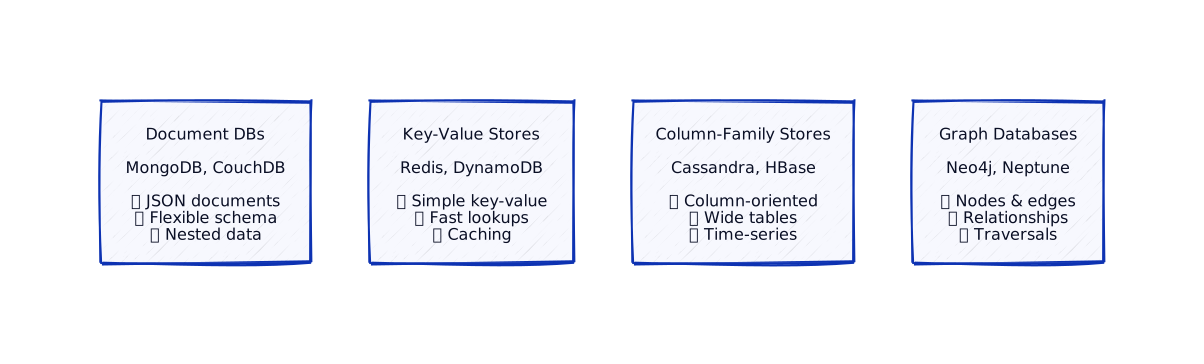
Type 1: Document Databases
Section titled “Type 1: Document Databases”Document databases store data as documents (JSON, BSON, XML). Documents are self-contained and can have nested structures.
How Document Databases Work
Section titled “How Document Databases Work”
Key Characteristics:
- Flexible schema: Each document can have different fields
- Nested data: Store related data together
- No JOINs: Related data in same document
- JSON-like: Easy to work with in applications
Examples: MongoDB, CouchDB, Amazon DocumentDB
Document Database Example
Section titled “Document Database Example”User Document in MongoDB:
{ "_id": 123, "name": "Alice", "address": { "street": "123 Main St", "city": "San Francisco", "zip": "94102" }, "orders": [ { "order_id": 1, "date": "2024-01-15", "items": [ {"product": "Laptop", "price": 1000}, {"product": "Mouse", "price": 20} ], "total": 1020 } ]}Benefits:
- All user data in one document
- No JOINs needed
- Easy to read/write
- Flexible (can add fields easily)
Type 2: Key-Value Stores
Section titled “Type 2: Key-Value Stores”Key-value stores are the simplest NoSQL databases. They store data as key-value pairs.
How Key-Value Stores Work
Section titled “How Key-Value Stores Work”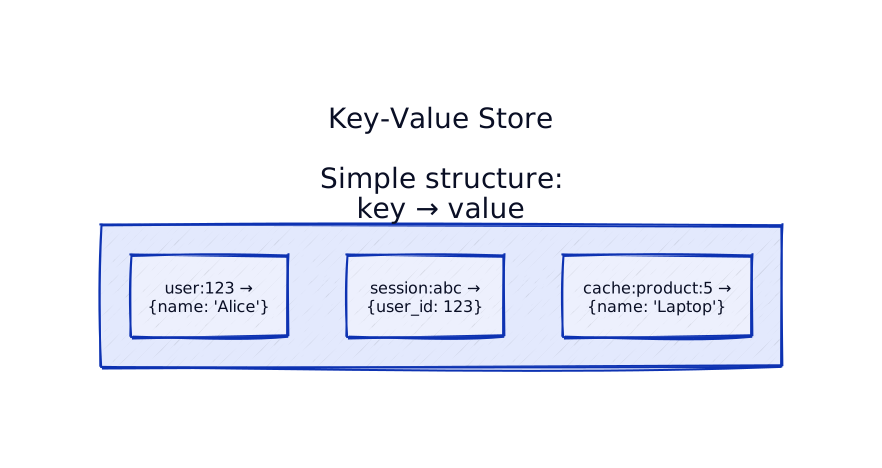
Key Characteristics:
- Simple: Just key-value pairs
- Fast: O(1) lookups by key
- Limited queries: Can only query by key
- Great for caching: Fast access patterns
Examples: Redis, DynamoDB, Memcached
Key-Value Store Use Cases
Section titled “Key-Value Store Use Cases”
Common Use Cases:
- Caching: Store frequently accessed data
- Session storage: User sessions
- Configuration: App settings
- Feature flags: Toggle features
Type 3: Column-Family Stores
Section titled “Type 3: Column-Family Stores”Column-family stores organize data by columns instead of rows. Data is stored in column families, optimized for reading specific columns.
How Column-Family Stores Work
Section titled “How Column-Family Stores Work”
Key Characteristics:
- Column-oriented: Data stored by columns
- Wide tables: Can have many columns
- Efficient reads: Read only needed columns
- Time-series: Great for time-series data
Examples: Cassandra, HBase, Amazon Keyspaces
Column-Family Example
Section titled “Column-Family Example”Time-Series Data in Cassandra:
| Row Key | Timestamp | Temperature | Humidity | Pressure |
|---|---|---|---|---|
| sensor:1 | 2024-01-01 10:00 | 25°C | 60% | 1013 |
| sensor:1 | 2024-01-01 11:00 | 26°C | 58% | 1014 |
| sensor:1 | 2024-01-01 12:00 | 27°C | 55% | 1015 |
Benefits:
- Efficient to read all temperatures
- Can add new columns easily
- Optimized for time-series queries
Type 4: Graph Databases
Section titled “Type 4: Graph Databases”Graph databases store data as nodes (entities) and edges (relationships). Optimized for relationship queries.
How Graph Databases Work
Section titled “How Graph Databases Work”
Key Characteristics:
- Nodes: Entities (users, products, etc.)
- Edges: Relationships (friends, purchases, etc.)
- Traversals: Follow relationships efficiently
- Relationship queries: “Find friends of friends”
Examples: Neo4j, Amazon Neptune, ArangoDB
Graph Database Example
Section titled “Graph Database Example”Social Network Graph:
Nodes:- User(id: 1, name: "Alice")- User(id: 2, name: "Bob")- User(id: 3, name: "Charlie")- Product(id: 10, name: "Laptop")
Edges:- (Alice) -[FRIENDS]-> (Bob)- (Bob) -[FRIENDS]-> (Charlie)- (Alice) -[PURCHASED]-> (Laptop)- (Bob) -[LIKES]-> (Laptop)Query: “Find products liked by friends of Alice”
- Start at Alice
- Traverse FRIENDS edges → Bob
- Traverse LIKES edges → Laptop
- Result: Laptop
Real-World Examples
Section titled “Real-World Examples”Major companies use NoSQL databases for different use cases:
Document Database: MongoDB at eBay
Section titled “Document Database: MongoDB at eBay”The Challenge: eBay stores product listings with varying structures. Some products have different attributes than others.
The Solution: eBay uses MongoDB for product catalog:
- Flexible schema: Each product category has different fields
- Nested data: Product details, images, reviews in single document
- Scale: Millions of products, fast queries
Why Document DB?
- Products have different structures (electronics vs clothing)
- Related data together (no JOINs needed)
- Fast reads (single document lookup)
Example: Product document:
{ "id": 12345, "name": "iPhone 15", "category": "Electronics", "specs": { "storage": "256GB", "color": "Blue" }, "reviews": [ {"user": "John", "rating": 5}, {"user": "Jane", "rating": 4} ]}Impact: Handles millions of products. Fast product pages. Flexible schema for different categories.
Key-Value Store: Redis at Twitter
Section titled “Key-Value Store: Redis at Twitter”The Challenge: Twitter needs fast access to user sessions, timelines, and cached data. Simple key-value lookups.
The Solution: Twitter uses Redis extensively:
- Sessions:
session:user123→ session data - Timelines:
timeline:user123→ cached timeline - Counters:
likes:tweet456→ like count
Why Key-Value?
- Simple lookups (O(1) access)
- Fast (in-memory)
- Perfect for caching
Example: Get user timeline:
- Key:
timeline:user123 - Value: Cached timeline data
- Access: O(1) lookup, instant response
Impact: Timeline loads in milliseconds. Handles billions of keys. Essential for Twitter’s performance.
Column-Family Store: Cassandra at Netflix
Section titled “Column-Family Store: Cassandra at Netflix”The Challenge: Netflix stores time-series data (viewing history, recommendations, analytics). Need to read columns efficiently.
The Solution: Netflix uses Cassandra:
- Time-series data: User viewing history by timestamp
- Column-oriented: Read specific columns efficiently
- Scale: Billions of rows, petabytes of data
Why Column-Family?
- Efficient column reads (only read needed columns)
- Time-series optimized (append-heavy workloads)
- Scales horizontally
Example: User viewing history:
- Row key:
user:12345 - Columns:
2024-01-01:movie1,2024-01-02:movie2, etc. - Query: Read all columns for user (efficient)
Impact: Handles billions of viewing records. Fast analytics queries. Scales to petabytes.
Graph Database: Neo4j at LinkedIn
Section titled “Graph Database: Neo4j at LinkedIn”The Challenge: LinkedIn needs to find connections between users efficiently. “People you may know” requires graph traversals.
The Solution: LinkedIn uses Neo4j:
- Nodes: Users, companies, skills
- Edges: Connections, works_at, has_skill
- Queries: “Find friends of friends who work at Google”
Why Graph DB?
- Efficient relationship traversals
- Complex queries (friends of friends)
- Natural fit for social networks
Example: Find connections:
- Start: User A
- Traverse: A → friends → B → friends → C
- Result: C is a friend of a friend
Impact: Fast connection discovery. “People you may know” in milliseconds. Handles billions of relationships.
Polyglot Persistence: Modern Applications
Section titled “Polyglot Persistence: Modern Applications”The Challenge: Modern applications have different data needs. One database can’t fit all.
The Solution: Companies use multiple databases:
- PostgreSQL: User accounts, orders (ACID transactions)
- MongoDB: Product catalog, content (flexible schema)
- Redis: Sessions, cache (fast lookups)
- Elasticsearch: Search (full-text search)
Example: E-commerce platform:
- PostgreSQL: User accounts, orders, payments
- MongoDB: Product catalog, reviews
- Redis: Shopping cart, sessions
- Elasticsearch: Product search
Impact: Right tool for each job. Optimized performance. Handles complex requirements.
NoSQL vs SQL: When to Use What?
Section titled “NoSQL vs SQL: When to Use What?”
| Aspect | SQL | NoSQL |
|---|---|---|
| Schema | Fixed, rigid | Flexible, dynamic |
| Queries | Complex JOINs | Simple lookups |
| Scale | Vertical | Horizontal |
| Transactions | ACID | Eventually consistent |
| Use Case | Financial, ERP | Social media, IoT |
LLD ↔ HLD Connection
Section titled “LLD ↔ HLD Connection”How NoSQL databases affect your class design:
Document Database Classes
Section titled “Document Database Classes”from dataclasses import dataclassfrom typing import List, Optional, Dictfrom datetime import datetime
@dataclassclass Address: street: str city: str zip_code: str
@dataclassclass OrderItem: product: str price: float quantity: int
@dataclassclass Order: order_id: int date: datetime items: List[OrderItem] total: float
@dataclassclass User: """Document model - all data in one structure""" _id: int name: str email: str address: Address # Nested object orders: List[Order] # Nested array
def to_document(self) -> Dict: """Convert to MongoDB document""" return { "_id": self._id, "name": self.name, "email": self.email, "address": { "street": self.address.street, "city": self.address.city, "zip": self.address.zip_code }, "orders": [ { "order_id": o.order_id, "date": o.date.isoformat(), "items": [ {"product": item.product, "price": item.price, "quantity": item.quantity} for item in o.items ], "total": o.total } for o in self.orders ] }import java.time.LocalDateTime;import java.util.*;
public class User { // Document model - all data in one structure private Integer id; private String name; private String email; private Address address; // Nested object private List<Order> orders; // Nested list
// Getters and setters...
public Map<String, Object> toDocument() { // Convert to MongoDB document Map<String, Object> doc = new HashMap<>(); doc.put("_id", id); doc.put("name", name); doc.put("email", email);
Map<String, Object> addr = new HashMap<>(); addr.put("street", address.getStreet()); addr.put("city", address.getCity()); addr.put("zip", address.getZipCode()); doc.put("address", addr);
List<Map<String, Object>> ordersList = new ArrayList<>(); for (Order order : orders) { Map<String, Object> orderDoc = new HashMap<>(); orderDoc.put("order_id", order.getOrderId()); orderDoc.put("date", order.getDate().toString()); // ... add items ordersList.add(orderDoc); } doc.put("orders", ordersList);
return doc; }}Key-Value Store Classes
Section titled “Key-Value Store Classes”class KeyValueStore: def __init__(self, redis_client): self.redis = redis_client
def get(self, key: str) -> Optional[str]: """Get value by key""" return self.redis.get(key)
def set(self, key: str, value: str, ttl: Optional[int] = None): """Set key-value pair""" if ttl: self.redis.setex(key, ttl, value) else: self.redis.set(key, value)
def delete(self, key: str): """Delete key""" self.redis.delete(key)
# Usage for cachingcache = KeyValueStore(redis_client)cache.set("user:123", json.dumps({"name": "Alice"}), ttl=3600)user_data = json.loads(cache.get("user:123"))import redis.clients.jedis.Jedis;import java.util.Optional;
public class KeyValueStore { private Jedis redis;
public Optional<String> get(String key) { String value = redis.get(key); return Optional.ofNullable(value); }
public void set(String key, String value) { redis.set(key, value); }
public void set(String key, String value, int ttlSeconds) { redis.setex(key, ttlSeconds, value); }
public void delete(String key) { redis.del(key); }}
// Usage for cachingKeyValueStore cache = new KeyValueStore(redis);cache.set("user:123", "{\"name\":\"Alice\"}", 3600);Optional<String> userData = cache.get("user:123");import Redis from 'ioredis';
class KeyValueStore { private redis: Redis;
constructor() { this.redis = new Redis(); }
async set(key: string, value: string, ttl?: number): Promise<void> { if (ttl) { await this.redis.setex(key, ttl, value); } else { await this.redis.set(key, value); } }
async get(key: string): Promise<string | null> { return await this.redis.get(key); }
async delete(key: string): Promise<void> { await this.redis.del(key); }}
// Usageconst cache = new KeyValueStore();const userData = await cache.get("user:123");#include <hiredis/hiredis.h>#include <string>
class KeyValueStore {private: redisContext* redis;
public: KeyValueStore(const std::string& host = "localhost", int port = 6379) { redis = redisConnect(host.c_str(), port); }
void set(const std::string& key, const std::string& value, int ttl = 0) { if (ttl > 0) { redisCommand(redis, "SETEX %s %d %s", key.c_str(), ttl, value.c_str()); } else { redisCommand(redis, "SET %s %s", key.c_str(), value.c_str()); } }
std::string get(const std::string& key) { redisReply* reply = (redisReply*)redisCommand(redis, "GET %s", key.c_str()); if (reply && reply->type == REDIS_REPLY_STRING) { std::string value(reply->str); freeReplyObject(reply); return value; } return ""; }
void del(const std::string& key) { redisCommand(redis, "DEL %s", key.c_str()); }
~KeyValueStore() { redisFree(redis); }};using StackExchange.Redis;
public class KeyValueStore { private readonly IDatabase db;
public KeyValueStore(IConnectionMultiplexer redis) { this.db = redis.GetDatabase(); }
public async Task SetAsync(string key, string value, TimeSpan? expiry = null) { await db.StringSetAsync(key, value, expiry); }
public async Task<string?> GetAsync(string key) { return await db.StringGetAsync(key); }
public async Task DeleteAsync(string key) { await db.KeyDeleteAsync(key); }}
// Usagevar redis = ConnectionMultiplexer.Connect("localhost");var cache = new KeyValueStore(redis);await cache.SetAsync("user:123", "{\"name\":\"John\",\"email\":\"[email protected]\"}", TimeSpan.FromHours(1));var userData = await cache.GetAsync("user:123");Deep Dive: Production Patterns and Advanced Considerations
Section titled “Deep Dive: Production Patterns and Advanced Considerations”Document Databases: Schema Evolution in Production
Section titled “Document Databases: Schema Evolution in Production”The Schema-Less Myth
Section titled “The Schema-Less Myth”Reality: Document databases are schema-flexible, not schema-less.
Production Challenge: Schema changes still require migration planning.
Example: Adding Required Field
Before:
{ "_id": 123, "name": "Alice",}After (New Required Field):
{ "_id": 123, "name": "Alice", "phone": "123-456-7890" // NEW REQUIRED FIELD}Migration Strategy:
class UserMigration: def migrate_user(self, user_doc): # Check if migration needed if 'phone' not in user_doc: # Backfill missing field user_doc['phone'] = self.fetch_phone_from_legacy_system(user_doc['_id']) self.collection.update_one( {'_id': user_doc['_id']}, {'$set': {'phone': user_doc['phone']}} ) return user_docProduction Pattern:
- Add field as optional (backward compatible)
- Backfill existing documents (background job)
- Make field required in application logic
- Eventually enforce at database level
Document Size Limits and Sharding
Section titled “Document Size Limits and Sharding”Problem: Documents have size limits.
Limits:
- MongoDB: 16MB per document
- CouchDB: No hard limit, but performance degrades >1MB
- DynamoDB: 400KB per item
Production Impact:
- Large documents: Slow to transfer, memory intensive
- Sharding: Large documents harder to shard efficiently
Solution: Reference Pattern
Instead of:
{ "_id": 123, "name": "Alice", "orders": [ { /* 1000 orders embedded */ } ]}Use References:
{ "_id": 123, "name": "Alice", "order_ids": [1, 2, 3, ...] // References}Benefit: Smaller documents, better sharding, faster queries
Key-Value Stores: Advanced Patterns
Section titled “Key-Value Stores: Advanced Patterns”Pattern 1: Distributed Counters
Section titled “Pattern 1: Distributed Counters”Challenge: Atomic increments across distributed systems.
Solution: Redis INCR
class DistributedCounter: def __init__(self, redis_client): self.redis = redis_client
def increment(self, key, amount=1): # Atomic increment return self.redis.incrby(key, amount)
def decrement(self, key, amount=1): return self.redis.decrby(key, amount)
def get(self, key): return int(self.redis.get(key) or 0)Production Use Cases:
- Page views: Track views across servers
- Rate limiting: Count requests per user
- Voting: Count votes in real-time
Pattern 2: Distributed Locks
Section titled “Pattern 2: Distributed Locks”Challenge: Coordinate across distributed systems.
Solution: Redis SETNX with TTL
class DistributedLock: def __init__(self, redis_client): self.redis = redis_client
def acquire(self, lock_key, ttl_seconds=10): # Try to acquire lock acquired = self.redis.set( lock_key, "locked", nx=True, # Only set if not exists ex=ttl_seconds # Expire after TTL ) return acquired is not None
def release(self, lock_key): self.redis.delete(lock_key)
@contextmanager def lock(self, lock_key, ttl_seconds=10): if self.acquire(lock_key, ttl_seconds): try: yield finally: self.release(lock_key) else: raise LockAcquisitionError("Could not acquire lock")Production Considerations:
- TTL: Prevents deadlocks (lock expires)
- Renewal: Extend TTL for long operations
- Fencing tokens: Prevent stale locks
Pattern 3: Pub/Sub for Event Distribution
Section titled “Pattern 3: Pub/Sub for Event Distribution”Challenge: Notify multiple services of events.
Solution: Redis Pub/Sub
class EventPublisher: def __init__(self, redis_client): self.redis = redis_client
def publish(self, channel, message): self.redis.publish(channel, json.dumps(message))
class EventSubscriber: def __init__(self, redis_client): self.redis = redis_client self.pubsub = redis_client.pubsub()
def subscribe(self, channel, handler): self.pubsub.subscribe(channel) for message in self.pubsub.listen(): if message['type'] == 'message': data = json.loads(message['data']) handler(data)Production Use Cases:
- Cache invalidation: Notify all servers to clear cache
- Event distribution: Distribute events to multiple consumers
- Real-time updates: Push updates to connected clients
Column-Family Stores: Production Considerations
Section titled “Column-Family Stores: Production Considerations”Wide Rows and Partitioning
Section titled “Wide Rows and Partitioning”Challenge: Wide rows (many columns) can become very large.
Example: Time-Series Data
Row Structure:
Row Key: sensor:1Columns: timestamp:2024-01-01-10:00 → temperature:25 timestamp:2024-01-01-10:01 → temperature:26 timestamp:2024-01-01-10:02 → temperature:27 ... (millions of columns)Problem: Row becomes too large, slow to read.
Solution: Row Partitioning
Partition by Time Window:
Row Key: sensor:1:2024-01-01Columns: Only columns for that day
Row Key: sensor:1:2024-01-02Columns: Only columns for next dayBenefit: Smaller rows, faster reads, better distribution
Compaction Strategies
Section titled “Compaction Strategies”Challenge: Column-family stores accumulate many versions (tombstones, updates).
Solution: Compaction
Types:
- Size-tiered compaction: Merge small files into larger ones
- Leveled compaction: Organize into levels, merge within levels
- Time-window compaction: Compact by time windows
Production Impact:
- Write amplification: Compaction rewrites data (2-10x)
- Disk I/O: High during compaction
- Performance: Compaction can slow down reads/writes
Best Practice: Schedule compaction during low-traffic periods
Graph Databases: Production Patterns
Section titled “Graph Databases: Production Patterns”Pattern 1: Relationship Traversal Optimization
Section titled “Pattern 1: Relationship Traversal Optimization”Challenge: Deep traversals can be slow.
Example: “Friends of Friends” Query
Naive Approach:
MATCH (user:User {id: 123})-[:FRIENDS]->(friend)-[:FRIENDS]->(fof)RETURN fofProblem: May traverse millions of relationships.
Optimized Approach:
MATCH (user:User {id: 123})-[:FRIENDS*2..2]->(fof)WHERE fof.id <> 123 // Exclude selfRETURN DISTINCT fofLIMIT 100 // Limit resultsProduction Techniques:
- Limit depth: Don’t traverse too deep
- Limit results: Use LIMIT clause
- Index relationships: Index on relationship properties
- Caching: Cache common traversals
Pattern 2: Graph Partitioning
Section titled “Pattern 2: Graph Partitioning”Challenge: Large graphs don’t fit on single machine.
Solution: Graph Partitioning
Strategies:
- Vertex-cut: Split vertices across machines
- Edge-cut: Split edges across machines
- Hybrid: Combination of both
Production Example: Neo4j Fabric
- Sharding: Distributes graph across multiple databases
- Query routing: Routes queries to appropriate shards
- Cross-shard queries: Merges results from multiple shards
Trade-off: Cross-shard queries are slower (network overhead)
NoSQL Performance Benchmarks: Real-World Numbers
Section titled “NoSQL Performance Benchmarks: Real-World Numbers”| Database Type | Read Latency | Write Latency | Throughput | Use Case |
|---|---|---|---|---|
| Document (MongoDB) | 1-5ms | 5-20ms | 10K-50K ops/sec | General purpose |
| Key-Value (Redis) | 0.1-1ms | 0.1-1ms | 100K-1M ops/sec | Caching, sessions |
| Column-Family (Cassandra) | 1-10ms | 5-50ms | 50K-200K ops/sec | Time-series, wide tables |
| Graph (Neo4j) | 5-50ms | 10-100ms | 1K-10K ops/sec | Relationship queries |
Key Insights:
- Key-Value: Fastest (in-memory)
- Document: Good balance (flexible + performant)
- Column-Family: Best for writes (LSM trees)
- Graph: Optimized for traversals (not raw speed)
Production Anti-Patterns
Section titled “Production Anti-Patterns”Anti-Pattern 1: Using NoSQL Like SQL
Section titled “Anti-Pattern 1: Using NoSQL Like SQL”Problem: Trying to do complex JOINs in document databases.
Bad:
// Trying to JOIN in MongoDB (doesn't work well)db.users.aggregate([ { $lookup: { from: "orders", ... } }, // Expensive! { $lookup: { from: "payments", ... } } // Very expensive!])Good:
// Denormalize data into documents{ "_id": 123, "name": "Alice", "recent_orders": [ /* embedded */ ], "payment_info": { /* embedded */ }}Lesson: Design for NoSQL’s strengths, not SQL patterns
Anti-Pattern 2: Ignoring Consistency Guarantees
Section titled “Anti-Pattern 2: Ignoring Consistency Guarantees”Problem: Assuming eventual consistency means “eventually correct”.
Reality: Eventual consistency can lead to permanent inconsistencies if not handled.
Example:
- User updates profile on Node A
- User reads profile from Node B (stale)
- User makes decision based on stale data
- Result: Wrong decision, even after consistency
Solution: Use read-after-write consistency, version vectors
Anti-Pattern 3: Over-Normalizing in Document DBs
Section titled “Anti-Pattern 3: Over-Normalizing in Document DBs”Problem: Normalizing like SQL (separate collections for everything).
Bad:
// Over-normalized (like SQL)Users collectionOrders collectionOrderItems collectionProducts collection// Need multiple queries to get order!Good:
// Denormalized (NoSQL style){ "_id": "order:123", "user": { "id": 456, "name": "Alice" }, // Embedded "items": [ { "product": "Laptop", "price": 1000 } // Embedded ]}// Single query gets everything!Lesson: Denormalize for read performance
Key Takeaways
Section titled “Key Takeaways”What’s Next?
Section titled “What’s Next?”Now that you understand different database types, let’s learn how to choose the right database for your use case:
Next up: Choosing the Right Database — Decision framework for database selection and mapping domain models to storage.