
Relational Databases Deep Dive
What is a Relational Database?
Section titled “What is a Relational Database?”A relational database organizes data into tables (relations) with rows (tuples) and columns (attributes). Tables are connected through relationships defined by keys.

ACID Properties: The Foundation
Section titled “ACID Properties: The Foundation”ACID is an acronym for four essential properties that guarantee reliable database transactions:

A: Atomicity
Section titled “A: Atomicity”Atomicity means a transaction is all-or-nothing. Either all operations succeed, or all fail (rollback).

Example: Transferring money between accounts. If deducting from Account A succeeds but adding to Account B fails, both operations are rolled back. You can’t have money disappear!
C: Consistency
Section titled “C: Consistency”Consistency ensures the database always remains in a valid state. All constraints, rules, and relationships are maintained.

Example: If a table has a constraint “age must be > 0”, the database will reject any transaction that tries to insert a negative age, keeping the database consistent.
I: Isolation
Section titled “I: Isolation”Isolation ensures concurrent transactions don’t interfere with each other. Each transaction sees a consistent snapshot of the data.

Example: Two users updating the same account balance simultaneously. Isolation ensures each transaction sees a consistent view and updates don’t interfere.
D: Durability
Section titled “D: Durability”Durability guarantees that once a transaction is committed, it persists even if the system crashes.

Example: After you commit a bank transfer, even if the server crashes immediately after, your transaction is safely stored and will be restored when the system recovers.
Real-World Examples
Section titled “Real-World Examples”Understanding how major companies use relational databases helps illustrate ACID properties in practice:
ACID in Financial Systems: Banking Transactions
Section titled “ACID in Financial Systems: Banking Transactions”The Challenge: Banks process millions of transactions daily. A single transaction failure could mean lost money or incorrect balances.
The Solution: Banks use ACID transactions extensively:
- Atomicity: Transfer $100 from Account A to Account B. Either both succeed (debit A, credit B) or both fail. No partial transfers.
- Consistency: Account balances always sum correctly. No negative balances allowed (constraints).
- Isolation: Two transfers happening simultaneously don’t interfere. Each sees consistent state.
- Durability: Once committed, transaction persists even if database crashes.
Example: User transfers $100:
- Begin transaction
- Debit Account A: $1000 → $900
- Credit Account B: $500 → $600
- Commit transaction
If database crashes between steps 3 and 4, transaction rolls back. Account A stays at $1000, Account B stays at $500. No money lost.
Impact: Zero data loss incidents. All transactions are atomic and durable. Critical for financial systems.
Normalization: E-commerce Product Catalog
Section titled “Normalization: E-commerce Product Catalog”The Challenge: E-commerce platforms store product data. Without normalization, product information is duplicated across orders, causing inconsistencies.
The Solution: Amazon uses normalized database design:
- Products table: Product ID, name, price, description (single source of truth)
- Orders table: Order ID, user ID, product ID (references product)
- Order Items table: Order ID, product ID, quantity (normalized)
Why Normalize? If product price changes:
- Without normalization: Must update price in millions of order records (inconsistent, slow)
- With normalization: Update price once in Products table, all orders reference it (consistent, fast)
Example: Product “iPhone 15” price changes from $999 to $899:
- Normalized: Update 1 row in Products table
- Denormalized: Update millions of rows in Orders table
Impact: Price updates instant and consistent. Reduced storage by 70% (no duplication). Faster queries.
Indexing: Social Media User Lookups
Section titled “Indexing: Social Media User Lookups”The Challenge: Social media platforms need to find users quickly. Searching 2 billion users without indexes would be extremely slow.
The Solution: Facebook uses extensive indexing:
- Primary index: User ID (fast user lookups)
- Unique index: Email (fast login lookups)
- Composite index: (name, location) for search
- Full-text index: User posts for search
Example: User searches for “John Smith in New York”:
- Without index: Scan 2 billion users (hours)
- With composite index: Direct lookup (milliseconds)
Impact: User search: 50ms (with index) vs 10+ seconds (without index). 200x faster. Handles billions of users efficiently.
PostgreSQL: GitHub’s Database Choice
Section titled “PostgreSQL: GitHub’s Database Choice”The Challenge: GitHub stores millions of repositories, users, and code. Needs strong consistency, complex queries, and reliability.
The Solution: GitHub uses PostgreSQL:
- ACID transactions: Ensures repository operations are atomic
- Complex queries: JOINs across repositories, users, issues, pull requests
- Reliability: Zero data loss, handles millions of operations daily
Why PostgreSQL?
- Strong ACID guarantees (critical for code repositories)
- Complex queries (find repositories by language, stars, forks)
- Mature and reliable (handles GitHub’s scale)
Impact: Handles 100+ million repositories. Zero data loss incidents. Complex queries execute in milliseconds.
MySQL: Facebook’s Early Choice
Section titled “MySQL: Facebook’s Early Choice”The Challenge: Facebook started with MySQL for user data, posts, and relationships. Needed to scale to billions of users.
The Solution: Facebook used MySQL extensively:
- User data: Profiles, friends, posts
- ACID transactions: Ensures data consistency
- Replication: Read replicas for scaling reads
Why MySQL?
- Mature and reliable
- Good performance for structured data
- Strong ACID guarantees
Impact: Handled billions of users. Strong consistency for user data. Foundation for Facebook’s growth.
Database Normalization
Section titled “Database Normalization”Normalization is the process of organizing data to reduce redundancy and eliminate anomalies. It involves splitting tables and creating relationships.
Why Normalize?
Section titled “Why Normalize?”
Normal Forms
Section titled “Normal Forms”Normalization follows normal forms (NF), each eliminating specific types of redundancy:

Normalization Example
Section titled “Normalization Example”Before Normalization (Problems):
| order_id | customer_name | customer_email | product_name | price | quantity |
|---|---|---|---|---|---|
| 1 | Alice | [email protected] | Laptop | 1000 | 1 |
| 2 | Alice | [email protected] | Mouse | 20 | 2 |
| 3 | Bob | [email protected] | Keyboard | 50 | 1 |
Problems:
- Customer info repeated (redundancy)
- If Alice changes email, need to update multiple rows
- If we delete order #2, we lose Alice’s info
After Normalization (3NF):
Customers Table:
| customer_id | name | |
|---|---|---|
| 1 | Alice | [email protected] |
| 2 | Bob | [email protected] |
Orders Table:
| order_id | customer_id | product_name | price | quantity |
|---|---|---|---|---|
| 1 | 1 | Laptop | 1000 | 1 |
| 2 | 1 | Mouse | 20 | 2 |
| 3 | 2 | Keyboard | 50 | 1 |
Benefits:
- Customer info stored once
- Update email in one place
- Delete order without losing customer info
Database Indexing
Section titled “Database Indexing”An index is a data structure that speeds up data retrieval. It’s like a book’s index—instead of scanning every page, you look up the index to find the exact location.
How Indexes Work
Section titled “How Indexes Work”
Analogy: Finding a word in a dictionary:
- Without index: Read every page (full table scan)
- With index: Use alphabetical index to jump directly (index lookup)
Types of Indexes
Section titled “Types of Indexes”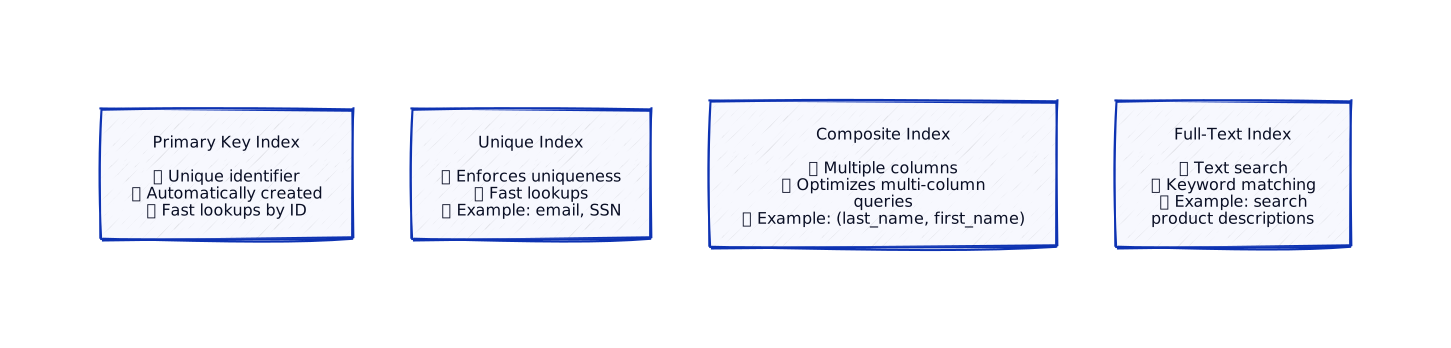
Index Trade-offs
Section titled “Index Trade-offs”| Aspect | Benefit | Cost |
|---|---|---|
| Read Speed | Much faster queries | Slower writes (must update index) |
| Storage | - | Extra storage space |
| Maintenance | - | Index must be maintained |
LLD ↔ HLD Connection
Section titled “LLD ↔ HLD Connection”How relational database concepts affect your class design:
Entity Classes Map to Tables
Section titled “Entity Classes Map to Tables”Repository Pattern for Data Access
Section titled “Repository Pattern for Data Access”ACID Transactions in Code
Section titled “ACID Transactions in Code”Key Takeaways
Section titled “Key Takeaways”What’s Next?
Section titled “What’s Next?”Now that you understand relational databases, let’s explore how isolation levels control what concurrent transactions can see:
Next up: Database Isolation Levels — Learn how read committed, repeatable read, and serializable isolation levels prevent race conditions.